
Most compliance teams know they get a lot of false positives. Fewer know what each one costs. Without that number, it is hard to make the case for better data, better tools or more staff.
The short answer is this. A false positive costs you:
- the analyst time to open, check, decide and record it
- slower onboarding for genuine customers while alerts wait in a queue
- a higher chance of missing a real match when the team is overloaded
The only reliable way to put a number on it is to measure your own alerts. This article shows what the published figures say, why they differ and how to build your own benchmark.
What is a false positive?
A false positive is an alert that turns out to be nothing after review. For example:
- Name screening: a customer shares a name, or part of a name, with someone on a sanctions or PEP list.
- Transaction monitoring: a payment breaks a rule, but the customer’s normal business explains it.
Your false-positive rate is the share of alerts you close as false positives. If you get 200 alerts in a month and clear 190, your rate is 95%.
A high rate is not a failure on its own. Screening tools are set to alert too often on purpose, because missing a real sanctions match is far worse than checking an extra name. The goal is not zero false positives. The goal is a volume your team can review properly, with proof that real matches are not slipping through.
How common are false positives?
Most sources agree that most alerts are false positives.
- McKinsey has reported that for most banks, more than 90% of transaction monitoring alerts are false positives.
- Vendors and industry writers often put sanctions screening false-positive rates at 85% to 95%.
These figures mostly come from large banks with complex systems. A smaller bank or fintech may see a different rate. It depends on its customers, the lists it screens and how good its customer data is.
Why time estimates vary so much
This is where most published ‘benchmarks’ fall apart. Here is the range found in current industry and vendor sources:
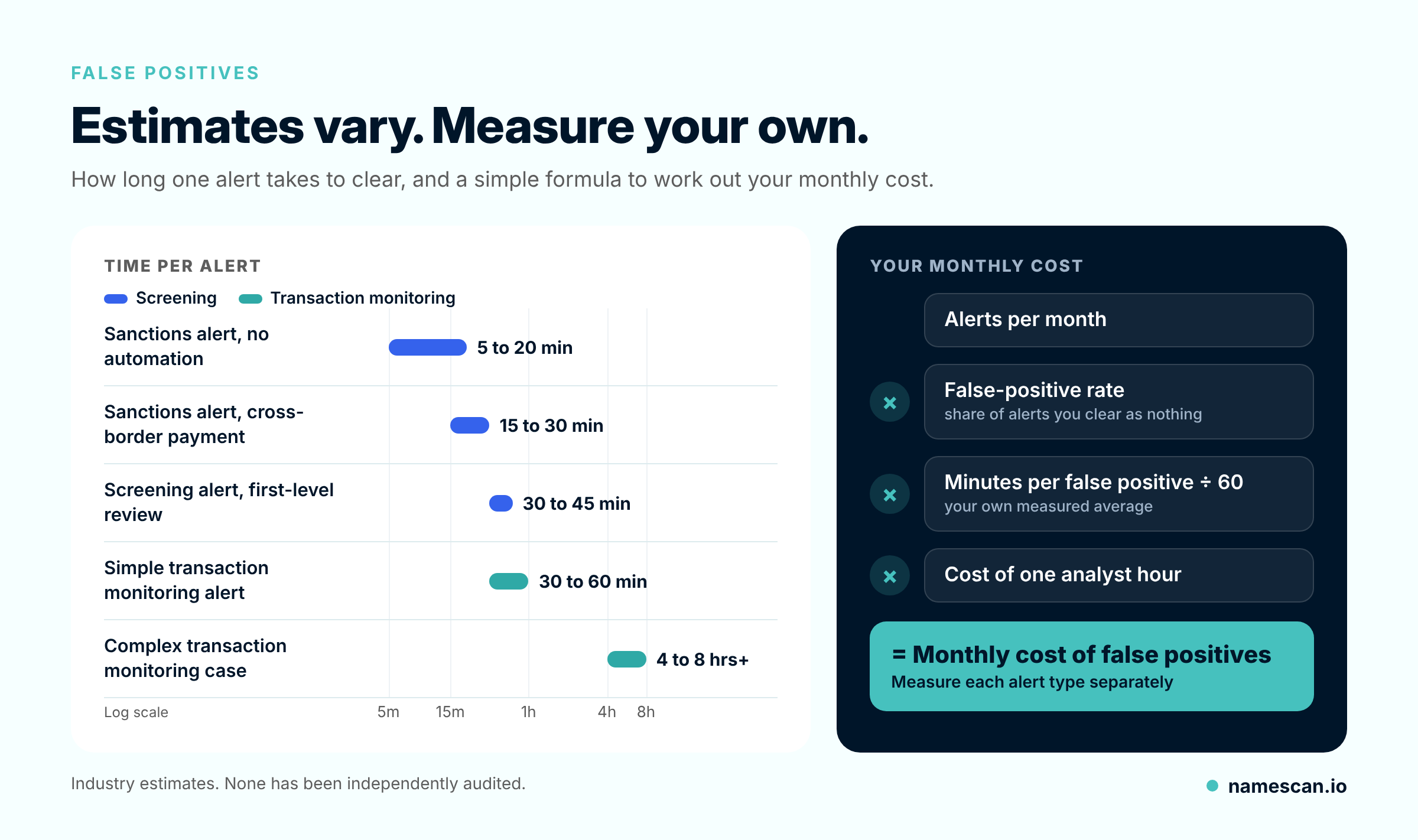
None of these has been independently audited. They differ for good reasons:
- Alert type. A name match with a clear date of birth is quick to clear. A transaction alert may need account history and a call to the account manager.
- Data quality. If your records include date of birth, nationality and address, many matches can be ruled out fast. If you only hold a name, the analyst has to dig.
- What is measured. Some figures count only active work time. Others count the full time from opening to closing, including waiting.
- Tools. Copying data between separate systems takes longer than seeing everything on one screen.
- Record keeping. A one-word note is quick. A clear reason that would stand up to an audit takes longer, as it should.
The cost beyond analyst time
Analyst time is the cost you can see. There are others.
- Staff costs are the biggest item. In 2024, LexisNexis Risk Solutions studied US and Canadian financial institutions. Compliance costs had risen for 99% of them. Labour was the largest cost. It also found that 78% of small institutions saw bigger rises in staff costs, compared with 63% of mid-sized and large ones.
- Customers wait. When alerts sit in a queue for days, genuine customers wait for accounts or payments. Some give up and go elsewhere.
- Tired teams miss things. Analysts rushing through high volumes are more likely to clear a real match by mistake. The Wolfsberg Group, an association of global banks, recommends testing a sample of cleared alerts to make sure no real matches were missed.
How to benchmark your own team
Your own numbers are more useful than any published figure. Four weeks of data are usually enough to start.
- Split alerts by type. Separate sanctions, PEP, adverse media and transaction monitoring alerts. If you can, separate onboarding alerts from ongoing checks too.
- Record start and finish times. Note when an analyst opens and closes each alert, and whether it was escalated. Many tools record this for you.
- Track two kinds of time. Active work time shows how many staff you need. Total time shows how long customers wait.
- Record the outcome. Was it a false positive, an escalation, a true match or a suspicious matter report?
- Note why each false positive was cleared. For example, a different date of birth or nationality. This shows which data would have stopped the alert.
- Check a sample. Each month, have a second person review a few closed alerts to confirm the decisions were sound and well recorded.
How to cut false positives safely
Reducing false positives only helps if you still catch the real matches. Common steps include:
- Screen with more details. Add date of birth, nationality or country, not just a name. This makes obvious mismatches easy to rule out.
- Clean your data. Messy name formats, missing dates of birth and free-text fields all create needless alerts.
- Handle cleared customers consistently. Wolfsberg guidance describes ways to stop re-reviewing the same confirmed false positive, while still alerting if the details change.
- Change matching settings with care. Looser matching means fewer alerts but can hide real matches. Record any change and test it.
- Screen the lists you actually need. Extra lists can add noise. But dropping a list should be a recorded, risk-based decision.
How NameScan can help
NameScan suits smaller banks, credit unions, fintechs and other regulated firms that clear their own alerts. With NameScan you can:
- screen people and businesses against PEP, sanctions and adverse media sources
- run checks online, in batches or through an API
- add details such as date of birth to narrow down results
- see the match details an analyst needs to make a decision
- keep a timestamped report of each check as evidence
NameScan does not set your matching rules or make decisions for you. It does not replace your AML/CTF programme. Each decision on a possible match stays with your team.
Frequently asked questions
What is a false positive in AML screening?
It is an alert that looks like a possible match but turns out not to be one. The most common example is a customer who shares a name with someone on a sanctions or PEP list.
What is a normal false-positive rate?
There is no official standard. Industry sources often quote 85% to 95% for sanctions screening, and McKinsey has reported more than 90% for transaction monitoring at most banks. Your own rate depends on your data, your customers and the lists you screen.
How long should it take to clear a false positive?
Published estimates range from about 5 minutes for a simple name match to several hours for a complex transaction case. The most useful figure is your own, measured by alert type.
How can I reduce false positives without missing real matches?
Screen with more identifying details, such as date of birth. Keep your customer data clean. Test any change to your matching settings, and check a sample of cleared alerts each month.
Do I need to record why I cleared a false positive?
Yes. It is good practice, and auditors or regulators may ask how you reached your decisions. A short, clear reason shows your thinking if your process is ever reviewed.
Next step
See what a NameScan match result looks like with a free sanctions check. Or read about pay-as-you-go PEP and sanctions screening if you want to screen without a subscription.
0 Comments